Launch
Multi roblox
Unlock simultaneous account execution on Windows without making unsafe modifications to game files. A lightweight, robust utility designed to close active Mutex descriptors and instantly bypass multi-client restrictions.
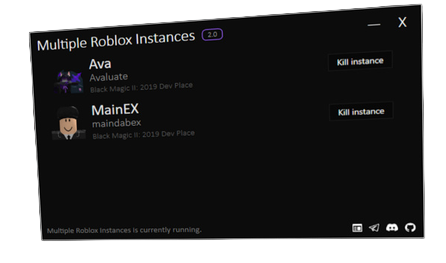
MainDab Legacy & Rebirth
Originally, this tool was integrated and distributed as part of the free, keyless exploit package called MainDab. Following the conclusion of the main software project, the engine was unarchived, completely stripped of external dependencies, and repackaged as a secure, independent, and open-source utility under MultipleRobloxInstances.
v2.2 Stability Updates
- Memory Leak Patch (Issue #24): Resolved critical system RAM usage issues over extended execution sessions.
- Process Lock Improvements: Removed redundant double-lock calls that caused intermittent client crashes.
- Discord RPC Integration: Restored proper Discord connection variables and activity details.
About MultipleRobloxInstances
MultipleRobloxInstances is a lightweight, high-performance utility developed for game creators, system testers, and Power-Users. Its goal is to allow the concurrent launch of multiple isolated clients without modifying game executables or violating security layers.
By natively querying Windows' API table to duplicate and gracefully release exclusive process ownership markers, it fools the operating system into starting isolated game environments securely. Unlike typical injectors or file-modification cheats, this tool runs entirely outside of the memory space of active clients, keeping you fully compliant with modern anti-cheat technologies.
Important Developer Disclaimer
This tool is specifically designed to aid game developers in local multiplayer testing, mechanics debugging, and alternative account deployment. Hosting massive client clusters that exceed your hardware's CPU/RAM boundaries or running extensive automated farming grids breaches standard game guidelines and is not supported by the MultipleRobloxInstances project team.
Core Application Features
Advanced Windows manipulation built safely and cleanly
Automated Mutex Hijacking
Dynamically tracks and releases Windows ROBLOX_singletonMutex without modifying original game code or compromising platform integrity.
Error 773 & Teleport Fixes
Resolves native matchmaking issues that result in Error 773: Teleport Failed when running multiple instances on the same machine.
Built-in Process Manager
Easily track and view all active game instances, memory properties, and process IDs (PIDs) using the console dashboard.
Anti-Idle / No Freeze
Ensures background clients continue running seamlessly without freezing or experiencing disconnects due to AFK timers.
Developer Automation Hook
Connect automation pipelines or custom game-testing suites straight to Mutex-release states for systematic QA testing.
Zero Registry Modifications
Runs entirely within volatile system memory. The program does not create registry files, stubborn startup items, or system clutter.
Installation & Usage Guide
Follow instructions precisely to establish secure connections
Download and Unpack
Grab the latest official bundle from our GitHub releases. Extract the contents completely to an accessible location on your local drive.
Target: C:\Program Files\MultipleRobloxInstances\
Launch MultipleRobloxInstances
Execute MultipleRobloxInstances.exe. Ensure that no active game client is currently running prior to start-up to establish a clean initialization state.
Running as Administrator is recommended but not mandatory.
Log into Primary Account
Navigate to the site, sign in with your primary account, and enter a server. Wait until the window is fully loaded and you are in-game.
Launch Alts & Secondary Accounts
Use secondary browsers, private windows, or multi-cookie extensions to log into additional accounts. Launch separate clients freely!
Pre-flight Checklist
Use browser utilities like Firefox's Multi-Account Containers or separate Chromium profiles to cleanly separate login cookie sessions.
Troubleshooting & FAQ
Answers to common connection configurations and bugs
System Architecture
Exploring Mutex manipulation protocols and deep code integration
Under the Hood: The Mutex Release Mechanism
Upon starting, standard desktop clients generate a mutual exclusion handle (ROBLOX_singletonMutex) to ensure only one instance of the game process is running on the current desktop.
Rather than executing risky memory injections or editing assemblies, MultipleRobloxInstances references the active system handle table, duplicates the exclusive token, and releases it securely using Windows API handles. This allows you to launch consecutive, isolated client windows seamlessly.
Compiling the Source Code
The application is written in C#/.NET. You can easily clone the source repository and compile the build locally inside Microsoft Visual Studio.
- Fully compatible with Windows 10 & 11
- Operates cleanly without covert background services
- Custom Visual Studio output profiles supported